By the UppearNow Team | Reviewed by Kenny Hart, Sr SEO Consultant | Last updated: October 2026
AI speed to lead means using AI tools to reply to new leads within seconds, at any hour, by text, email, chat or phone. The AI answers questions, asks a few qualifying questions and books a call or appointment, then hands the conversation to a person. It doesn’t replace your sales team. It makes sure no lead waits for them.
Only about one in five US businesses use AI at all, according to the Census Bureau’s Business Trends and Outlook Survey (19.8% in May 2026). Yet replying to leads is one of the easiest places to start. The job is repetitive, it has to happen at all hours, and success is simple to measure: did the lead get a fast, useful reply, and did it turn into a booking?
This guide covers what AI does well, where it goes wrong, how to set it up, and the rules to follow before it texts or calls anyone.
The four kinds of AI speed-to-lead tools
Most setups combine two or three of these:
| Tool | What it does | Best for |
|---|---|---|
| AI text and email follow-up | Replies to form and portal leads within seconds, asks qualifying questions, sends a booking link | Businesses with lots of web leads |
| AI voice receptionist | Answers calls when your team can’t, captures details, books appointments | Trades, clinics, law firms, anyone who misses calls |
| Website chatbot | Talks to visitors on your site, answers questions, captures contact details | Sites with traffic but few form fills |
| AI lead scoring and routing | Reads each lead, flags the urgent ones, sends them to the right person | Teams with several salespeople |
Prices vary widely by tool and usage. Our breakdown of AI chatbot costs covers typical plans.
What AI does well, and when a person should step in
AI is fast and consistent, but it doesn’t judge situations the way people do. Divide the work like this:
| Let AI handle | Hand to a person |
|---|---|
| The first reply, within seconds | Pricing negotiations and custom quotes |
| Common questions (hours, areas served, services) | Complaints or upset customers |
| Collecting details: name, need, timing, budget | Complex or unusual requests |
| Booking calls and appointments | Anything legal, medical or financial |
| Reminders and no-reply follow-ups | Leads who ask to speak to a person |
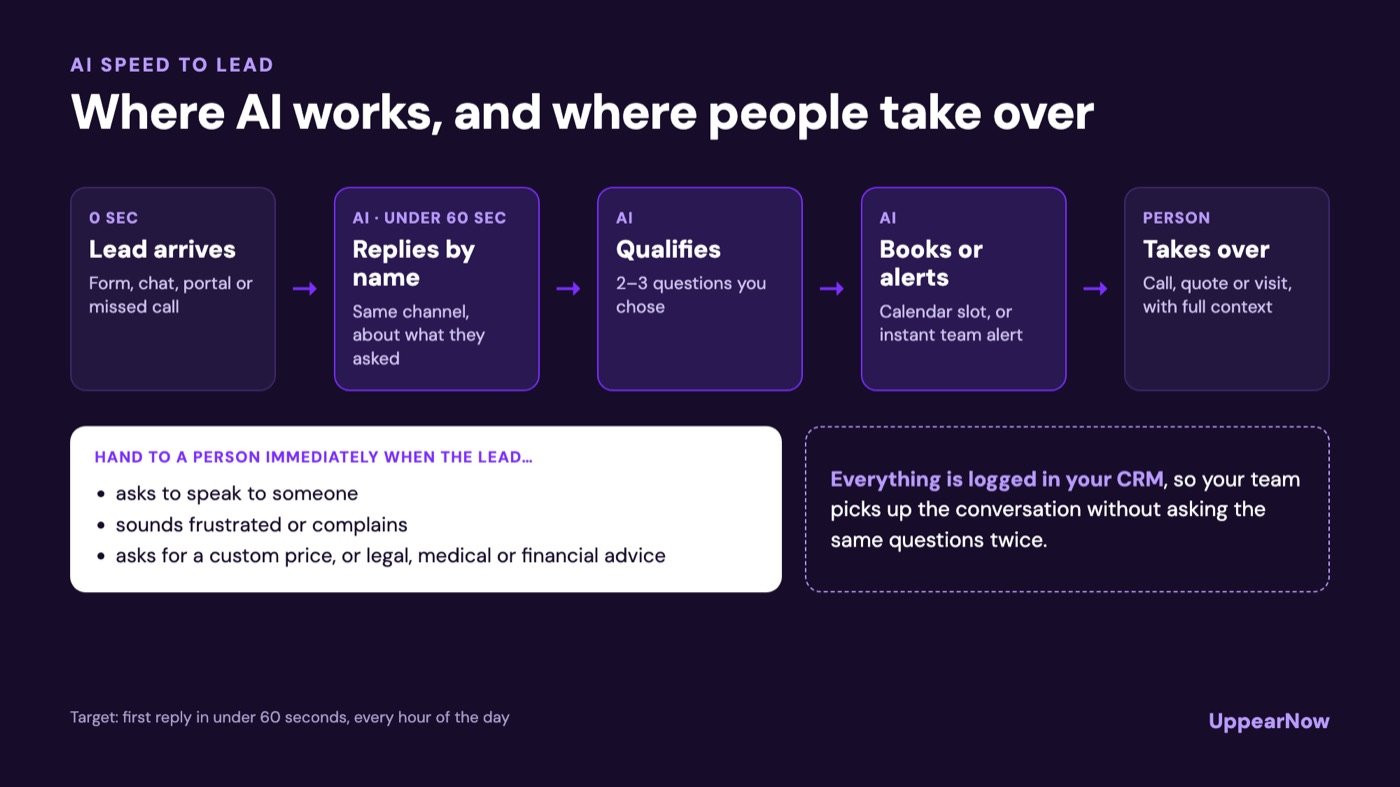
The rule that prevents most problems: the AI hands over the moment a lead asks for a human, shows frustration, or asks something outside its instructions. A fast handover keeps the speed without the robotic dead ends people hate.
How an AI speed-to-lead workflow runs
Here’s what happens to a single lead, start to finish:
- The lead arrives: a form, a chat, a portal enquiry or a missed call.
- The AI replies within 60 seconds on the same channel, using the lead’s name and what they asked about.
- It qualifies with two or three questions you’ve chosen in advance.
- It books or escalates. Ready leads get a calendar slot. Hot or unusual leads trigger an instant alert to your team.
- Everything is logged in your CRM: the conversation, the answers and the booking.
- A person takes over for the call, the quote or the visit, already knowing what the lead needs.
Setting it up in five steps
1. List every place leads come from
Website forms, chat, phone, portals, social messages and email. Each one needs a route into the AI, or it stays as slow as it is today.
2. Write the AI’s playbook
Give it your services, prices or price ranges, service areas, opening hours, qualifying questions and booking rules. Include what it must never do: quote exact prices without approval, give advice, or promise dates.
3. Connect your calendar and CRM
The AI can only book appointments if it can see real availability. It can only help your team if every conversation lands in the system they already use.
4. Set handover triggers
Decide exactly when a person takes over: certain keywords, a high-value lead, a complaint, a request for a human, or no booking after a set number of messages.
5. Test with 20 fake leads before going live
Send it easy leads, awkward ones and off-topic ones. Read every conversation. Fix the playbook where it stumbled, then go live and review real conversations weekly for the first month.
Tip: Start with one channel, usually website forms or missed calls. Get it working well, then add the next. Launching everywhere at once makes problems hard to trace.
Rules to follow before AI texts or calls anyone
Automated outreach in the US is regulated, and AI doesn’t get an exemption. The main points:
- AI voices count as “artificial” voices. In February 2024 the FCC ruled that calls using AI-generated voices fall under the TCPA’s rules for artificial and prerecorded voices, so they need the right prior consent. See the FCC declaratory ruling.
- Texts need consent too. Replying to someone who just asked you a question is different from sending marketing. Add clear consent wording to your forms, covering calls and texts about the enquiry.
- Opt-outs must work instantly. If someone replies STOP or asks not to be contacted, the AI has to stop. The FCC’s broader “revoke all” consent rule has been delayed until January 31, 2027, but honoring opt-outs straight away is still the safe default.
- Tell people they’re talking to AI. California’s bot disclosure law (SB 1001) requires bots to disclose that they’re bots when used to encourage a sale in some situations. Being upfront also builds trust, wherever you are.
- Consent rules keep changing. In January 2025, a federal appeals court struck down the FCC’s planned “one-to-one” consent rule for lead generators. Rules like this change often, so check them before each campaign.
Nothing here is legal advice. Have your attorney review your consent wording and scripts before launch.
Watch out: Never let an AI agent make cold outbound calls to purchased lists. That’s where TCPA lawsuits come from, and an AI voice doesn’t change the rules.
How to tell if it’s working
Compare these numbers for the month before and the month after you switch it on:
- Median time to first reply: this should drop to under a minute.
- Contact rate: more leads should reply or pick up.
- Bookings per 100 leads: the number that pays for the tool.
- Handover rate: if the AI hands most leads to people, its playbook needs work. If it almost never does, check that it isn’t overreaching.
- Customer feedback: read a sample of conversations each week. Polite, short and helpful is the goal.
Want AI replying to your leads in seconds, set up properly and compliant? UppearNow builds and runs AI lead follow-up for small businesses.
Book a free growth reviewBenchmarks and a free lost-revenue calculator are in our main speed to lead guide. If you sell homes, read speed to lead for real estate. Or see how our AI lead follow-up service and AI chatbot development work.
Frequently asked questions
Can AI respond to leads instantly?
Yes. Connected to your forms, chat and phone system, AI tools usually reply within seconds, day or night, and can ask questions and book appointments in the same conversation.
Is it legal to use AI to call or text leads?
It can be, with the right consent. The FCC treats AI-generated voices as artificial voices under the TCPA, so calls need prior consent, and texts follow similar consent rules. Get consent on your forms, honor opt-outs immediately, and have an attorney check your setup.
Will customers know they’re talking to AI?
They should. Some states, including California, require bots to identify themselves in certain sales conversations, and being upfront is good practice everywhere. Most people care more about getting a fast, useful answer than about who sends it.
Does AI replace a receptionist or sales assistant?
Not fully. AI handles the first reply, the repetitive questions and after-hours cover. People still handle quotes, negotiations, complaints and relationship building. Most businesses use AI so their staff spend time on the leads most likely to buy.
How much does AI lead follow-up cost?
It depends on the tool, how many conversations you have and whether phone calls are included. Chat and text tools usually charge per month or per conversation, while voice tools often charge per minute. See our AI chatbot cost guide for typical price ranges.